"Segment, then control, then inpaint, then upscale, then color-match. Skip a step and you will spend the afternoon wondering why the cat has two shadows and one of them is purple."
A Pipeline That Has Learned the Order Matters
Real production editing is rarely one model call; it is a directed pipeline of stages (segment, control, inpaint, upscale, color-match) where each stage consumes the output of the previous one, and the craft is in managing what flows between stages and finding which stage broke when the final image looks wrong. No single model does everything well: a control model fixes layout but not resolution, an inpainter edits a region but not the global color, an upscaler adds detail but cannot change content. Composing them gives a result no individual model could produce, but composition introduces its own failure modes, color drift across stages, seams between regions edited at different times, latent-versus-pixel handoff errors, and the only way to build reliable workflows is to treat the pipeline as a system you can inspect and debug stage by stage.
A client sends one photo of a room and asks you to swap the sofa, sharpen the result to print resolution, and keep everything else identical. No single model does that. You will reach for the segmenter, the control model, the inpainter, and the upscaler from the five sections before this one, and the moment you chain them the cat sprouts a second shadow and one of them is purple. This final section turns that toolbox into a reliable pipeline. By the end you will be able to lay out an editing workflow as a directed graph, manage the latents and color that flow between its stages, isolate which single stage broke when the output looks wrong, and author the whole thing in the node-graph tools the practitioner community uses to share these pipelines. We build on spatial control from Section 35.1, personalization from Section 35.2, masked editing from Section 35.3, instruction editing from Section 35.4, and faithful inversion from Section 35.5.
1. A Workflow Is a Directed Graph Beginner
A multi-step edit is a directed acyclic graph: nodes are operations (a segmenter, a ControlNet generation, an inpaint, an upscaler), and edges carry data (an image, a mask, a latent, a control map). The same composability that Chapter 34 found inside a single text-to-image system reappears at the level of whole models. Consider a common product task: take a photo of a room, replace the sofa with a different one, and deliver a clean high-resolution result. Figure 35.6.1 shows the graph.
2. A Workflow in Code Intermediate
The graph in Figure 35.6.1 is a sequence of the tools this chapter built. Written as a function, the pipeline reads top to bottom, with each stage's output named so you can inspect it. The depth map comes from a monocular depth network of Chapter 27, the mask from SAM, the controlled inpaint from a ControlNet inpainting pipeline, and the color match from a simple statistics transfer. The final upscaler is a learned super-resolution model (a diffusion upscaler or a network such as Real-ESRGAN) that maps a low-resolution image to a higher one with invented detail, the deep-learning descendant of the classical super-resolution of Chapter 7.
# A composable five-stage sofa-replacement pipeline: segment the sofa, derive a
# depth map, inpaint a new sofa in correct perspective, color-match and feather the
# seam, then upscale. Each stage's output is named so it can be inspected later.
import numpy as np, cv2, torch
from PIL import Image

def replace_sofa(photo, click_xy, new_prompt,
                 segmenter, depth_model, control_inpaint, upscaler):
    """Five-stage workflow: segment -> depth -> controlled inpaint -> color match -> upscale."""
    img = np.asarray(photo)

    # Stage 1: tight mask of the sofa from one click (Section 35.3).
    mask = segmenter.mask_from_point(img, click_xy)
    mask = cv2.dilate((mask * 255).astype(np.uint8), np.ones((11, 11), np.uint8))

    # Stage 2: depth map for correct perspective (Chapter 27, used by ControlNet).
    depth = depth_model(photo)                       # PIL depth image

    # Stage 3: inpaint the new sofa, conditioned on depth so it sits in perspective.
    edited = control_inpaint(prompt=new_prompt, image=photo,
                             mask_image=Image.fromarray(mask),
                             control_image=depth, num_inference_steps=30).images[0]

    # Stage 4: match the edited region's color stats to the original, then feather.
    edited = match_color(np.asarray(edited), img, mask)
    edited = composite_with_feather(photo, Image.fromarray(edited),
                                    Image.fromarray(mask), feather_px=10)

    # Stage 5: upscale to delivery resolution (a diffusion or ESRGAN upscaler).
    return upscaler(edited)

def match_color(src, ref, mask):
    """Shift the edited region's mean/std toward the original photo's, per channel."""
    m = mask.astype(bool)
    out = src.astype(np.float32)
    for c in range(3):                               # align per-channel statistics
        s, r = out[..., c][m], ref[..., c][m]
        out[..., c][m] = (s - s.mean()) / (s.std() + 1e-6) * r.std() + r.mean()
return np.clip(out, 0, 255).astype(np.uint8)replace_sofa chains the five stages and names each artifact (mask, depth, edited), while match_color aligns the edited region's per-channel mean and standard deviation to the original. The named intermediates are exactly what makes the pipeline debuggable in subsection 4, and the composite_with_feather helper is the one from Section 35.3.3. Cross-Stage Consistency Intermediate
Three consistency problems recur whenever you chain generative stages, and each has a standard remedy. Color drift: every diffusion or VAE pass shifts color and contrast slightly, so after several stages the edited region no longer matches the original photo's tone. The remedy is an explicit color-match step (the match_color above transfers per-channel mean and standard deviation, the histogram-statistics idea from Chapter 2), or working in latent space as long as possible and decoding once at the end. Resolution mismatch: stages often run at different resolutions (control at 512, upscale to 2048), and naive resizing blurs masks and edges; keep masks at full resolution and resize only the latents the model needs. Latent-versus-pixel handoff: passing a decoded image between stages incurs a VAE round trip each time, accumulating loss, so high-quality pipelines keep the latent across compatible stages and decode only when a stage genuinely needs pixels (such as segmentation).
The two cheapest wins in any multi-stage workflow are: stay in latent space until the last possible moment (each VAE decode/encode round trip loses a little detail and shifts color, so doing it five times instead of once visibly degrades the result), and keep every mask at the original pixel resolution (downscaling a mask to the latent grid and back blurs the edit boundary into a smear). These two habits prevent the majority of "the composite looks soft and slightly off-color" complaints before they happen.
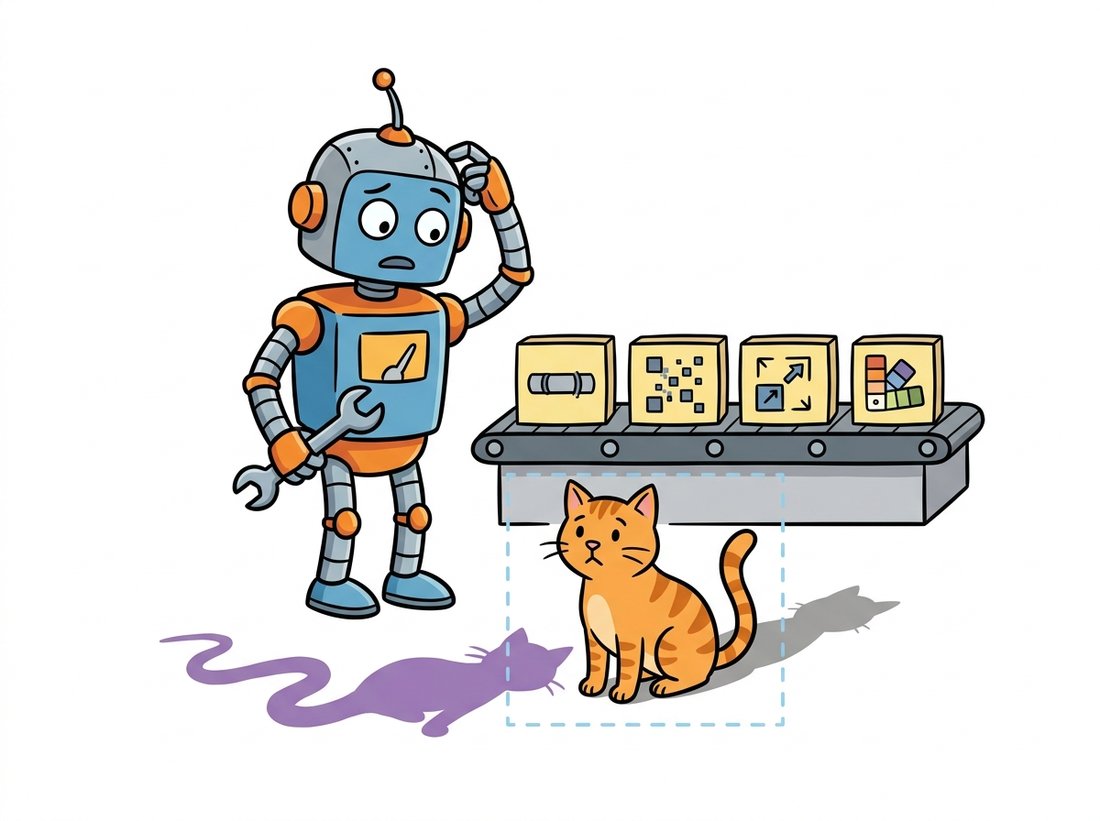
The epigraph's purple second shadow is not a joke at the model's expense; it is a genuine failure signature. Chain an inpaint that invents its own lighting onto an upscaler that hallucinates detail onto a color-match step pointed at the wrong reference, and the new object arrives lit from a direction nothing else in the scene agrees with, casting a shadow the original photo never had. Seasoned pipeline builders develop a sixth sense for these tells: doubled shadows mean a lighting mismatch upstream, a faint rectangle around an edit means a feather that was too narrow, and an oddly crisp object in a soft photo means the upscaler ran after the inpaint instead of on the whole frame. The bug is almost never in the stage you are looking at. The illustration below shows exactly this confession in action.
4. Debugging: Find the Stage That Broke Intermediate
When a five-stage workflow produces a bad final image, the worst thing you can do is tweak the final stage. The discipline is to trace the pipeline stage by stage and inspect the intermediate artifact at each edge, exactly as you would debug any multi-stage system. Save and view the mask: is it tight and correct, or did SAM grab the wrong object? View the depth map: is the perspective sane? View the raw inpaint before color-match and feathering: is the new content right but the color off (a stage-4 problem) or is the content itself wrong (a stage-3 problem)? The first stage whose intermediate artifact is wrong is the bug; everything downstream of it is operating on bad input and is not the root cause. The instrumented variant below writes each intermediate to disk for exactly this trace.
# Instrumented variant of the workflow: it writes each intermediate (mask, depth,
# raw inpaint) to disk so you can open them in order and spot the first wrong one.
# The first bad intermediate is the broken stage; everything after it is a symptom.
def replace_sofa_debug(photo, click_xy, new_prompt, **stages):
    """Same workflow, but dump every intermediate so the broken stage is visible."""
    img = np.asarray(photo)
    mask = stages["segmenter"].mask_from_point(img, click_xy)
    Image.fromarray((mask * 255).astype(np.uint8)).save("dbg_1_mask.png")    # check tightness
    depth = stages["depth_model"](photo)
    depth.save("dbg_2_depth.png")                                            # check perspective
    edited = stages["control_inpaint"](prompt=new_prompt, image=photo,
        mask_image=Image.fromarray((mask * 255).astype(np.uint8)),
        control_image=depth, num_inference_steps=30).images[0]
    edited.save("dbg_3_inpaint.png")     # is content right but color/seam wrong, or content wrong?
    # Inspect dbg_1..dbg_3 in order; the first wrong one is the bug.
return editedreplace_sofa_debug saves dbg_1_mask.png, dbg_2_depth.png, and dbg_3_inpaint.png; viewing them in order localizes the failure to a single stage, since a wrong mask explains every downstream symptom and there is no point tuning the upscaler until the mask is right.Who: a creative agency producing dozens of retouched product and lifestyle images per day, 2024. Situation: different artists used different ad-hoc sequences of tools, and quality and turnaround varied wildly; a junior artist's edit might have a visible seam a senior one would have caught. Problem: the knowledge of "segment first, color-match before upscale, never decode twice" lived in a few people's heads, and bad outputs were debugged by random tweaking. Decision: they encoded the standard workflow as a shared ComfyUI graph (subsection 5) with the stages of subsection 2 as fixed nodes, plus a debug branch that exported every intermediate. New artists loaded the graph, changed only the prompt and the mask click, and any bad output was diagnosed by walking the saved intermediates. Result: consistent quality across the team, turnaround halved, and onboarding that took days instead of weeks because the pipeline was the documentation. Lesson: a workflow captured as an inspectable graph is both a productivity tool and an institutional memory; the order and the handoffs that experts know implicitly become explicit, shareable, and debuggable.
5. Authoring Workflows: Node Graphs Advanced
Writing every workflow as Python is fine for engineers but slow to iterate and hard to share with artists. The practitioner community converged on node-graph editors, above all ComfyUI, which expose exactly the directed-graph model of subsection 1 as a visual canvas. Each node is an operation (load model, encode prompt, apply ControlNet, sample, VAE decode, upscale), each wire carries a typed artifact (latent, image, mask, conditioning), and the graph runs only the nodes whose inputs changed, so iterating on the last stage does not recompute the first. The graph format is shareable as a single file, which is why community workflows for "consistent character," "product relighting," or "high-res inpaint" circulate as downloadable graphs rather than code.
The conceptual payoff is that the node graph makes the data flow, and therefore the consistency problems of subsection 3, visible. You can see where a latent is decoded to pixels and re-encoded (a round-trip you might eliminate), where a mask is resized, and where two branches merge. The mental model is the same one this whole chapter has used: control is a stack of composable operations, and understanding the seams between them is what lets you build, predict, and fix.
The two ecosystems play complementary roles. Prototype and iterate in ComfyUI: the visual graph lets you rewire stages, swap a ControlNet, or insert a color-match node in seconds, and its caching means only changed nodes recompute. Once the workflow is fixed, port it to a diffusers Python pipeline like subsection 2 for programmatic deployment, batching, and integration into a service, where you want code, not a canvas. Many teams export the validated ComfyUI graph and translate its nodes one-to-one into diffusers calls. The graph is the design artifact; the Python pipeline is the production artifact.
The multi-stage workflow exists because no single 2023-era model could do everything. The 2024 to 2025 frontier is shrinking the graph. Unified editing models and the in-context editors of Section 35.4 (FLUX.1 Kontext, 2025, arXiv:2506.15742) absorb several stages, segmentation, control, masked editing, into one conditioned pass, so "replace the sofa and keep the perspective" becomes a single instruction with no explicit mask or depth node. Agentic systems go further, using a multimodal model to plan the workflow: it decides which tools to call in what order, runs them, inspects the result, and retries, automating the very debugging discipline of subsection 4. GenArtist (NeurIPS 2024, arXiv:2407.05600) is a concrete instance, an MLLM agent that decomposes a request into a tree of generation and editing tool calls with step-by-step verification and self-correction. The directed-graph mental model stays essential, because even when a model or an agent composes the stages internally, reasoning about where a result degraded still means reasoning about the pipeline of operations that produced it.
For the sofa-replacement task, explain why each ordering constraint holds: why segmentation must precede inpainting, why color-matching must come after inpainting but before upscaling, and why upscaling should be last. Then give one example of a wrong ordering and predict the specific artifact it would produce (for instance, upscaling before inpainting), connecting each to a consistency problem from subsection 3.
Compose a workflow that makes two edits to one photo: replace an object (Section 35.3) and then change the overall season with an instruction edit (Section 35.4). Save every intermediate as in replace_sofa_debug. Run it, then deliberately introduce a bug (for example, feed an un-dilated mask) and demonstrate that walking the saved intermediates localizes the failure to the masking stage rather than the final instruction edit. Report which intermediate revealed the bug.
Take a four-stage latent-diffusion workflow (control generation, inpaint, second inpaint, upscale) and count how many times the image is decoded to pixels and re-encoded if each stage is implemented independently versus if latents are kept across compatible stages and decoded once. Estimate the qualitative effect on detail and color of the extra round trips, referencing the VAE reconstruction loss from Chapter 31, and recommend where in the graph the single decode should happen.